

Academy > OptionLogic
STO Journal
Academy->STO Journal
The STO Journal is where OptionLogic tracks the complete lifecycle of your cash-secured put and covered call positions. Unlike a traditional trade log that records individual transactions, the STO Journal follows each position from the moment a put is sold through assignment, covered calls, recovery, and eventually closing the position. The goal is simple: Stop tracking transactions. Start tracking positions.
A Position-Centered Approach
Most brokers record each option trade as a separate transaction. While this is useful for order history, it can make it difficult to understand the complete story behind a position. OptionLogic takes a different approach.
Each position is organized around a single assigned stock position, allowing you to see:
- The original cash-secured put.
- Assignment details.
- Every covered call sold.
- Premium collected.
- Current cost basis.
- Position profit or loss.
- Current status.
Instead of jumping between unrelated transactions, you see the entire position in one place.
Parent and Child Positions
The STO Journal uses two related sections.
Parent Position
The parent position represents the original cash-secured put and assigned shares.
It stores information such as:
- Stock ticker.
- Assignment date.
- Original strike price.
- Shares owned.
- Cost basis.
- Current position value.
- Overall status.
Every covered call sold against the assigned shares is linked to the parent position.
This creates a complete history showing:
- Premium collected.
- Expiration dates.
- Strike prices.
- Buybacks.
- Assignments.
- Position progression over time.
As your position evolves, the journal evolves with it.
Position Status
OptionLogic automatically tracks the current state of each position.
Examples include:
- Open
- Assigned
- Recovering
- Paid
- Called Away
- Closed
This allows you to quickly identify where each position stands without reviewing individual transactions.
More Than a Trade Log
The STO Journal isn't simply a record of completed trades.
It is the foundation for many of OptionLogic's features, including:
- Current Position P/L
- Cost Basis Tracking
- Recovery Analysis
- Performance Reporting
Because every position is connected, OptionLogic can calculate information that would otherwise require significant manual work.
OptionLogic in Practice
The STO Journal serves as the foundation of OptionLogic. Every premium collected, every assignment, every covered call, and every position adjustment contributes to a complete picture of your investment. By tracking the entire lifecycle of a position, OptionLogic helps you understand where you've been, where you are today, and what opportunities may be available next.
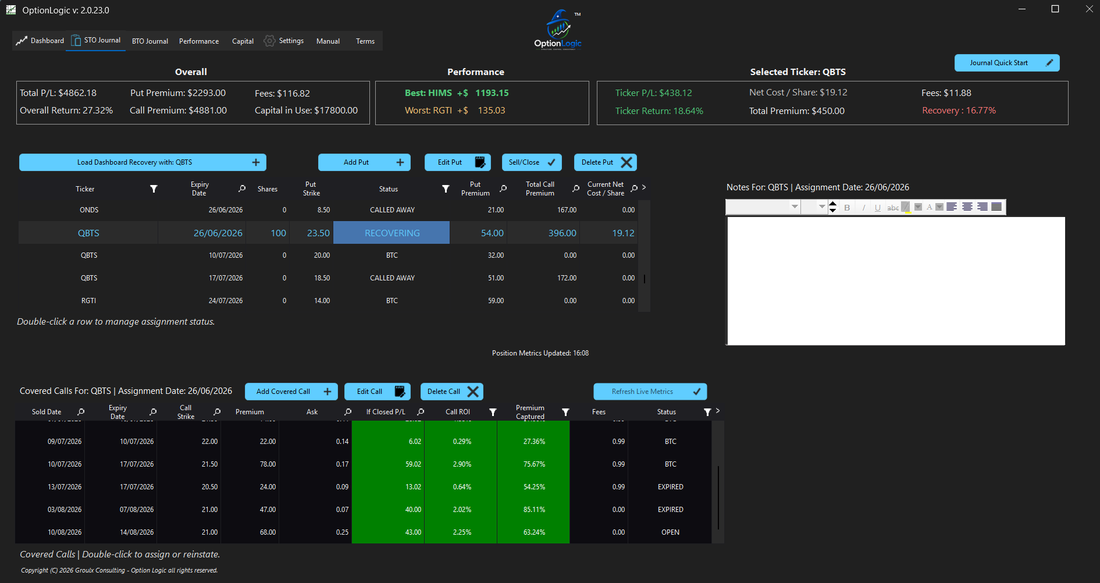
Cash Secured Puts are entered and tracked in the top table while the associated Covered Calls are tracked in the bottom table.
Frequently Asked Questions
What is the STO Journal?
The STO Journal tracks the complete lifecycle of cash-secured put and covered call positions, from the initial put sale through assignment, recovery, and closing.
Why doesn't OptionLogic track individual trades separately?
Individual trades are still recorded, but OptionLogic organizes them into complete positions so you can better understand how each trade affects the overall investment.
What is the difference between the parent position and covered calls?
The parent position represents the assigned shares, while each covered call sold against those shares is linked beneath it, creating a complete position history.
Can I see my current cost basis?
Yes. OptionLogic continuously updates your position as premiums are collected, allowing you to monitor your current cost basis throughout the life of the position.
Why is the STO Journal important?
The STO Journal provides the information required for Recovery Analysis, Position Management, Performance Reporting, and many other OptionLogic features.
Continue Learning