

Academy > OptionLogic
Recovery Analysis
Academy->Recovery Analysis
Recovery Analysis is one of OptionLogic's most powerful features. After shares have been assigned, many traders ask the same question: "What should I do now?" Manually comparing dozens of covered call opportunities across multiple expiration dates can be time-consuming and overwhelming.
Recovery Analysis was designed to simplify that process.
Rather than evaluating one option at a time, OptionLogic analyzes multiple covered call opportunities based on your actual position, helping you compare possible outcomes before making your next decision.
Built Around Your Position
Unlike a standard option chain, Recovery Analysis begins with your current position.
OptionLogic automatically considers information such as:
- Current cost basis
- Number of shares owned
- Current stock price
- Premiums already collected
- Available strike prices
- Available expiration dates
Because every assigned position is different, every analysis is unique.
Compare Multiple Opportunities
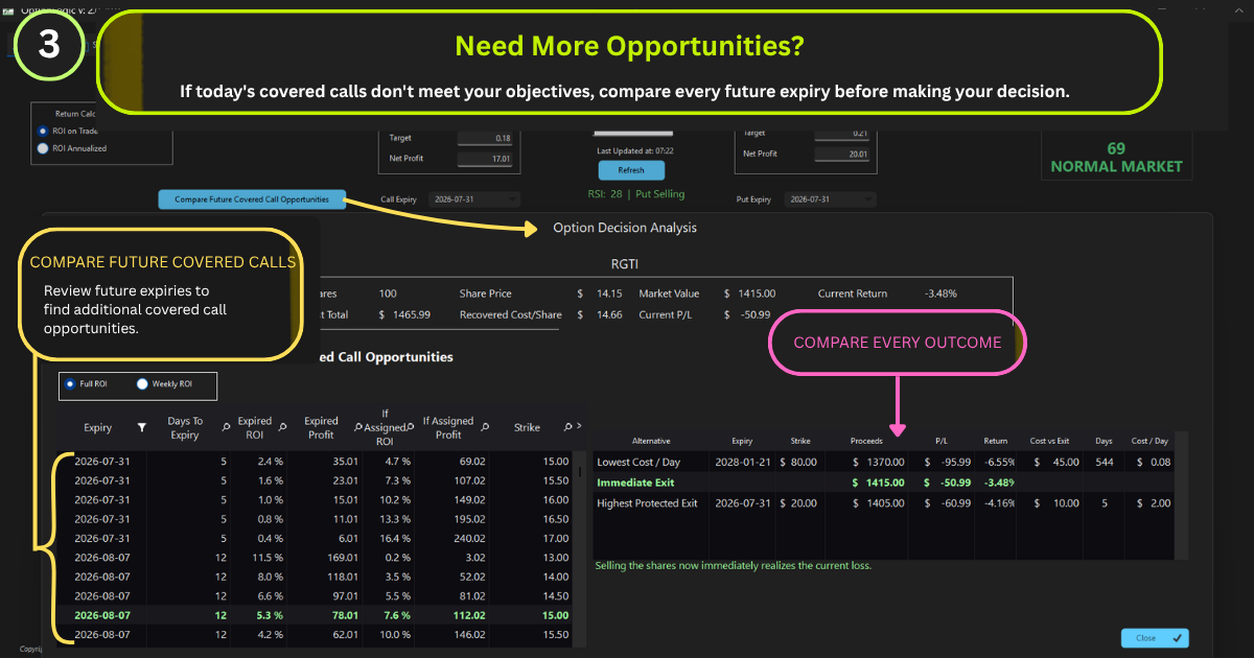
Instead of recommending a single covered call, Recovery Analysis displays every qualifying covered call that produces a positive return based on your current cost basis.
This allows you to compare opportunities using information such as:
- Strike price
- Expiration date + Future Expiration dates with calculated Premiums and ROI
- Premium
- Return on Investment (ROI)
- Annualized ROI
- Days to expiration
Every opportunity is presented so you can choose the one that best matches your objectives.
More Than Just Premium
The highest premium isn't always the best decision.
Some covered calls may:
- Generate more income.
- Offer a higher strike price.
- Produce a faster annualized return.
- Better align with your recovery goals.
Recovery Analysis allows you to compare these trade-offs before placing your next covered call.
Protective Put Analysis
Recovery Analysis also includes protective put analysis. By comparing available protective puts, OptionLogic helps you understand how downside protection may affect your current position. Rather than focusing on a single contract, the software compares multiple possibilities so you can evaluate different approaches to managing risk.
Designed for Better Decisions
Recovery Analysis does not predict where a stock will move.
Instead, it organizes complex option information into meaningful comparisons based on your existing position.
The objective is simple: Help you understand your recovery opportunities before making your next decision.
OptionLogic in Practice
Recovery Analysis represents the core philosophy behind OptionLogic. Rather than telling you what to trade, the software analyzes your current position, compares possible outcomes, and presents the information in a way that is easy to understand.
The decision always remains yours.
Frequently Asked Questions
What is Recovery Analysis?
Recovery Analysis evaluates your assigned stock position and compares multiple covered call opportunities based on your current cost basis.
Does Recovery Analysis recommend a trade?
No. OptionLogic presents qualifying opportunities and allows you to compare possible outcomes before making your own decision.
Why does Recovery Analysis use my cost basis?
Your current cost basis affects the profitability of every covered call opportunity. Using your actual position provides a more meaningful analysis than evaluating option contracts in isolation.
Why are only positive opportunities displayed?
Recovery Analysis focuses on covered calls that produce a positive return based on your current cost basis, allowing you to concentrate on opportunities that meet your recovery objectives.
Can I compare different expiration dates?
Yes. Recovery Analysis evaluates multiple expiration dates and strike prices, allowing you to compare a wide range of possible outcomes.
Continue Learning
➡ Performance Window